Today we’re sitting down with our senior engineer, Richard Player to hear what got him into the AI space.
Q: How did you get into the Automation/AI space?
A: I started out in the nuclear industry–analyzing accident scenarios and using that analysis to reduce risk. That work inspired me to hone my skills by joining Georgia Tech’s M.S. in Analytics program, which in turn led me to AutoIntel and all of the awesome opportunities in the AI space.
Q: What are you most excited about for the future of AI?
A: There is a lot of potential for AI to be used to enhance the field of logistics–from self driving vehicles to optimized routes-–I’m really excited about that.
Q: When you’re not optimizing the industrial world, how do you spend your free time?
A: On the weekend I love to be outside, camping, canoeing, or just exploring everything the Atlanta area has to offer.
Rising warehouse labor costs are driving more and more companies to invest in Automatically Guided Vehicles (AGVs). The return on an AGV investment is a function of how many AGVs you purchase, so it is critical to determine exactly how many you will need; right-sizing your fleet could save your company millions. Traditional analyses carried out on spreadsheets using averages (of demand and labor availability) are insufficient for such a complex system. Simulation, on the other hand, is a much more appropriate tool to validate a design decision, as it can accurately account for the complexity and seasonality of the underlying system.
Why Now for AGVs?
The cost of warehouse employees has increased 30% since 2013, and 6.7% since 2018. The is attributable to growth in e-commerce and the arrival of Amazon who can afford to pay warehouse employees as much as $15 per hour. Less loyalty means greater turnover: in a study of over 15K warehouse workers conducted by Prologistix, pay was the #2 reason employees switched employers, and 69% of employees that switched employers did so for an increase of $2 per hour or less! Since warehouse demand is highly seasonal, companies may end up losing their best employees right when they need them most, e.g. the holidays, and with them goes a wealth of knowledge and dependability.
AGVs, on the other hand, are deterministic. They work at a known rate every day and are dependable. Developing a design basis for the type and number of vehicles can be complex, but it’s only necessary once.
Building the Business Case
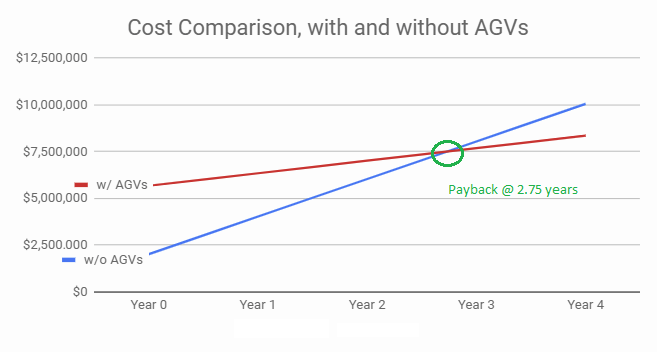
Capital Authorization comes down to 2 things: cost and savings. Confidence in both makes everyone’s job easier. Consider the following example:
No AGVs: 30 employees @ $67,000 = $2.01M/yr
With AGVs: 10 employees and 20 AGVs = $670k/yr + $30k/yr maintenance + $5M investment
Typical Consumer Product manufactures target an 18-month to 3-year payback period. All else equal, rising operations cost shifts the payback sooner which makes an investment in AGVs more attractive.
Greasing the skids through emulation
It’s not common practice to test the integrated systems before they’re installed. It’s a new technology called emulation which is analogous to digital twins. Essentially, the computer systems which act as traffic cops for AGVs are connected directly to the simulated system. This allows the OEM and site team to test and fix the systems before start-up — typically saving 50% of start up costs.
Bottom line savings
The savings from right-sizing depends on the size and application, and it typically comes from the cost of AGVs. Simulating and emulating can save $500k to $3M in optimizing the investment.
If you have too many AGVs…
You’ll know once you track utilization reports in the field. Typically conservative assumptions may be the root cause. Other unexplored formats could have provided the same service level at a reduced cost.
If you have too few…
Going back for more $$ is rarely a pleasant process. And it may impact your organizations commitment to automation over the next several years. You’ll know once order levels aren’t met on time and labor resources are greater than expected once the system is installed.
Many of the folks we run into seem a little confused by the terminology. Often times practitioners use “simulation” and “emulation” interchangeably, while in fact they are very different. This post will serve as a quick tutorial on both simulation and emulation.
10,000 Foot Overview
First things first – simulation and emulation are both techniques for answering questions about something in the real world by building a “model” of it.
Simulation is used to answer questions about the performance of a system. Let’s say for example that your company is considering either building a new manufacturing facility or adding capabilities to an existing one. Before you make a decision, you’ll likely want to know how key metrics like throughput will change in each scenario so you can determine which investment has the highest expected return.
Emulation, on the other hand, is used to answer questions about the control-logic of a system, i.e. is the automated equipment programmed correctly?
For those that don’t know how automated equipment works: an automated system functions like a loop. The automated equipment is controlled by a computer called a PLC, or programmable logic controller. Sensors in the facility send signals to the PLC ➔ the PLC then receives those signals and sends instructions out to the automated equipment, e.g. a robot, conveyor, diverter, etc. ➔ the equipment executes its instructions causing the state of the system to change ➔ the sensors report the new state of the system to the PLC ➔ the loop continues.
In an emulation, we create a high-fidelity software model of the facility, and connect it to the PLC to create the same loop as above. We want to test as many scenarios as possible to find ways in which the PLC programming might cause a problem in real life so that it can be corrected.
That might have sounded a bit confusing, so here is an example. Consider a conveyor that is feeding packages to a robot. A laser sensor (known in the industry as a photo eye) indicates whether a package is present and tells the conveyor to stop so that the robot can pick the package up. In a simulation, you might just be interested in how many boxes the robot can move. In an emulation, you will actually test the code that controls the conveyor and the robot.
When we start sending boxes down the conveyor in the model, the emulated photo eye will generate the same signal as the real photo eye, i.e. either 1 or 0 depending on whether or not a box is present. This signal is then sent to the PLC, which is unaware that it is listening to the software and not the actual physical equipment. The logic controller processes the input and sends instructions back to the emulation, e.g. tell the robot to pick up the box. The software reacts to the PLC’s instructions exactly as the physical system would, and if there is an error, e.g. the robot goes to the wrong location or uses too much force such that it crushes the package, we will catch it. The process of testing the control logic using offline using an emulation is called virtual commissioning.
You might be wondering how accurately the computer model can represent reality. The answer is very accurately. Recent advances in computation allow us to account for the physics of the physical system! Consider the previous example with the conveyor and boxes: what happens if the friction between the box and the conveyor belt is not enough to keep the box from flying off at a given speed, or what happens if the robot applies too much force to the box as it is picking it up? These are the types of questions we would seek to answer in an emulation so that we can tune the programming of the automated equipment and avoid these types of problems in real life.
When and why should we use a model?
Ok, so now we understand the tools, but when do we really need them? The emulation case seems more straightforward, but what about simulation? Why not just plug some numbers into a spreadsheet and call it a day?
Why simulate?
Model Complexity
Consider the following system with inputs arriving at rate and a server processing the inputs at a rate of :
Assume for a moment that this system represents a new machine that you are considering adding to your facility. You know how quickly WIP is arriving (i.e. the arrival rate ), and the manufacturer of this new machine has told you service rate, , i.e. how many units it can process in a given amount of time. What if I asked you how many units you’d have in the queue on average, or how long each unit would wait on average in this system before exiting? How would you approach the problem?
The answer comes with good and bad news:
The good news is that queueing theory is a very well-studied branch of operations research, and there are equations to calculate things like average queue length and time spent waiting.
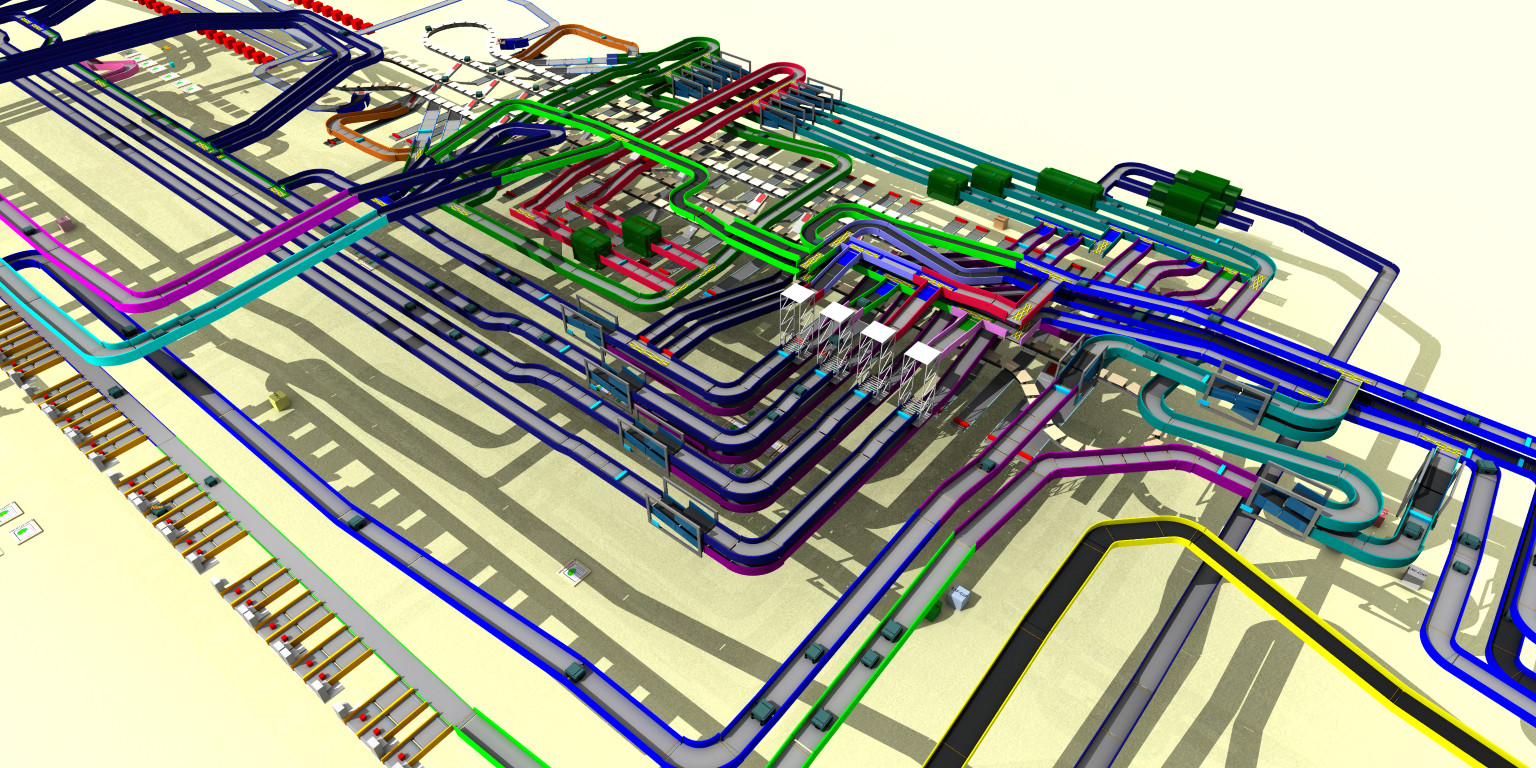
The bad news is that real systems like the one below are much more complex, and unfortunately there are no equations to describe their behavior. The best way to estimate how this system will perform is to simulate it.
Image courtesy of Demo3D
Randomness
In the real world, we can’t predict everything. Things like machine failure, service times for broken machines, customer arrivals and orders, etc. are all unpredictable. The more complex your system is, the more susceptible your results are to randomness, and the greater the benefit of simulating the system.
When simulating phenomena like the ones mentioned above, it’s really important to have a solid understanding of the probabilistic assumptions you are making. I have seen too many instances of bad assumptions ruining a model. A few examples:
A customer was rationalizing an investment in new machinery and did not account for machine failure/down-time in their model. The customer grossly over-estimated throughput by assuming the machine would be up 100% of the time. Because of this, the ROI realized on the project was substantially lower than what was projected.
In another example dealing with machine failures, a customer was using a poor choice of probability distribution when modeling when the machines would fail and how long it would take them to get fixed. Despite including randomness in the model, the customer’s predictions were way off compared with their actual performance.
Why Emulate?
I spent a lot of time in the introduction explaining the types of problems emulation can solve. Below, I’ll quickly address the main benefits of deploying an emulation model in your organization.
Save Time and Money!
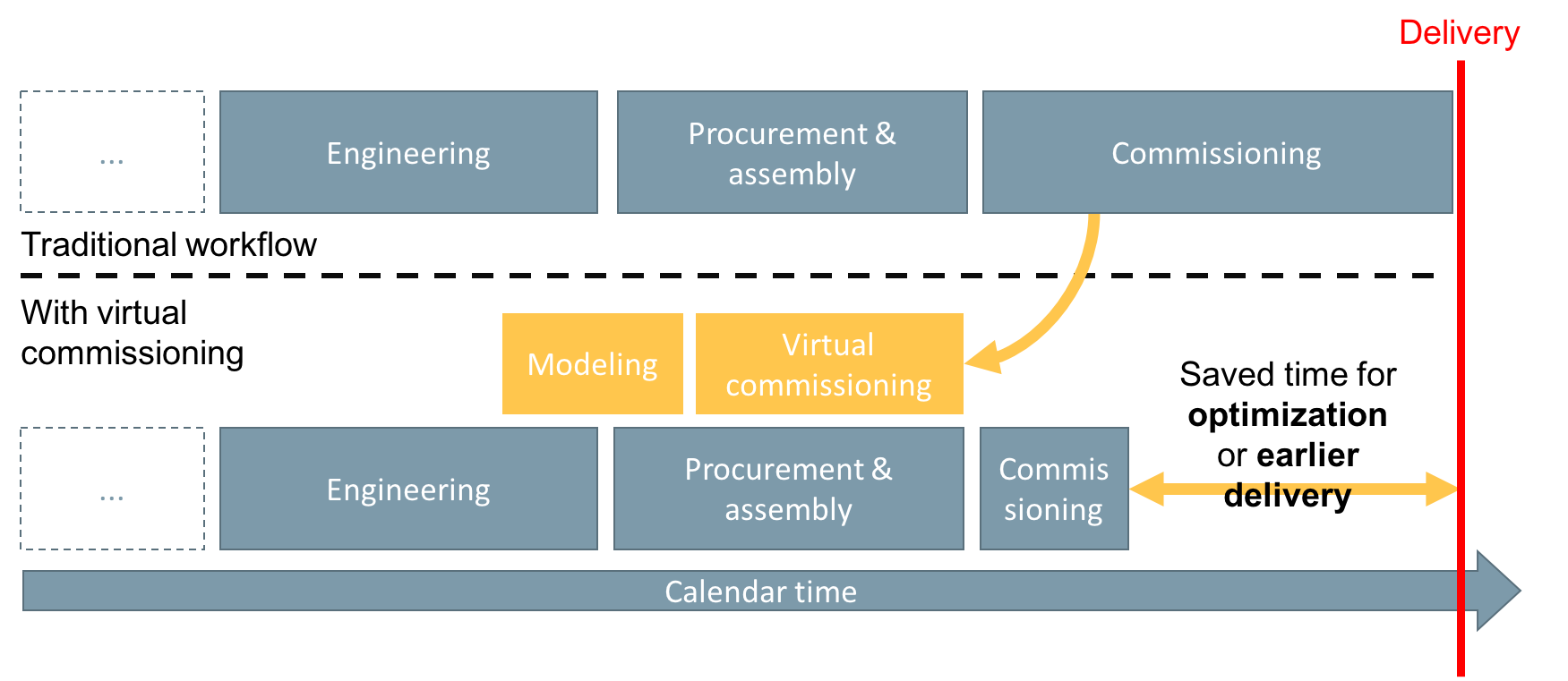
Virtual commission, i.e. testing the controls logic offline using an emulation, allows us to complete automation projects much faster. Check out the diagram below.
Photo courtesy of Virtual Components
Faster project completion means your system is generating revenue much sooner, increasing your ROI. Additionally, future updates to your system are completed much faster since you will already have a library of tests you can run to pinpoint issues.
Use Virtual Reality to Train Machine Operators
This one may sound less obvious since we haven’t addressed VR yet in this post, however all of the models we build at Automation Intelligence can be experienced in VR. The same screens that a machine operator would use in real life to control the machines (called HMIs, or human machine interfaces, in industry) can be incorporated into the virtual facility. Because the virtual representation is actually connected to the logic controllers, the machines will react exactly the same way in the virtual world as they would in real life. This opens the door for a safe and interactive way to train machine operators, and is much more effective than using handbooks and manuals alone.
Remote collaboration
Additionally, emulation combined with virtual reality allows remote teams to look at the same model together in real time from anywhere in the world. This greatly improves your team’s ability to diagnose and fix problems with your automated system quickly.
Automation Intelligence’s team includes both seasoned engineers and academics with operations research expertise. For more information, please reach out to info@autointel.io.



 and a server processing the inputs at a rate of
  :
:
 Automation Intelligence